HOW TO BUY/SELL A TWITTER ACCOUNT IN EPICSWP
1263 views Posted 3y ago 7 screenshots
Description
Twitter is an amazing platform to express your opinions and connect with your audience (if you have a big social media presence). However, it’s not easy to get thousands of followers on Twitter.
This is why many people like to buy and sell their Twitter accounts. These accounts have many followers and a great reach. If you’re starting out on your social media venture, then having such an account is very useful.
You can take a look at EPICSWP’s Twitter Marketplace to find listings for Twitter accounts.
So today, we will tell you how you can buy or sell a Twitter account and how to prepare it for transfer. The process is quite simple. Simply follow the steps below.
We’ll be showing you the process through the web version of Twitter, but the app version is exactly the same since Twitter uses the same interface.
Follow the steps below:
1. First of all, open Twitter and sign in to your newly bought account with the credentials.
2. Once you’re logged in, click on “More” on the left side of your screen

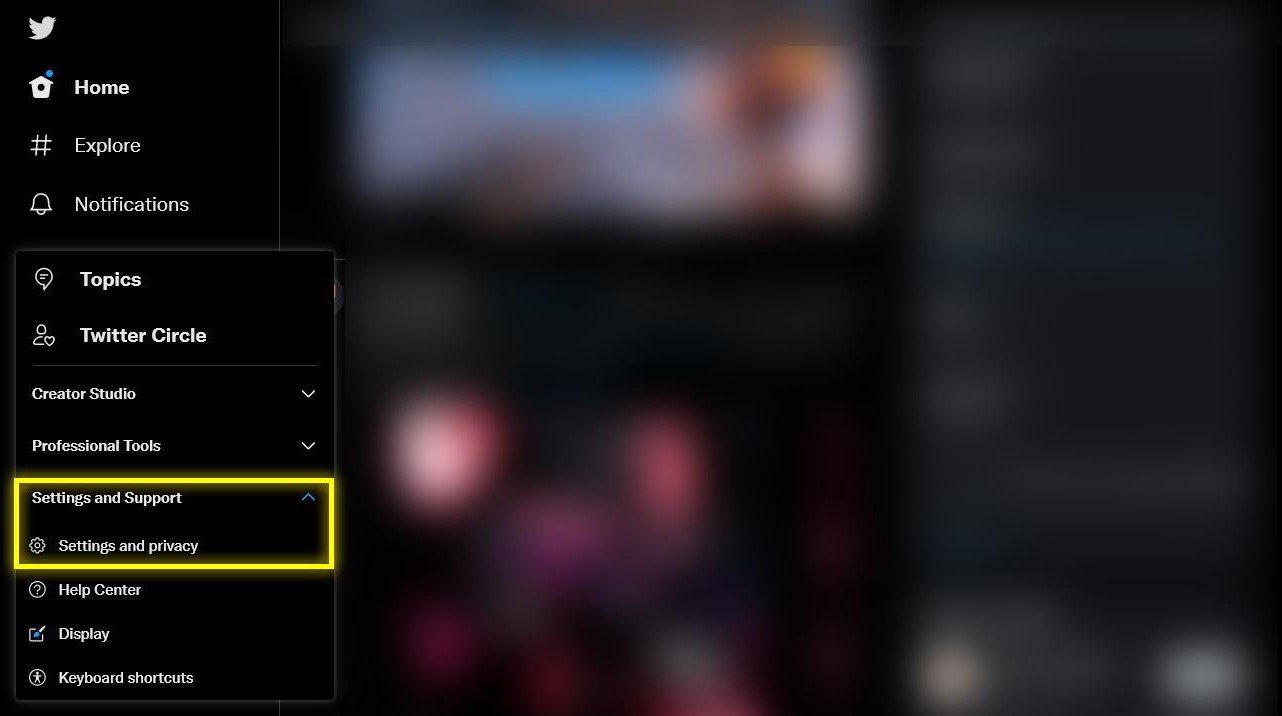
3. A drop-down menu will appear. Click on “Settings and Support,” then click on “Setting and privacy.”
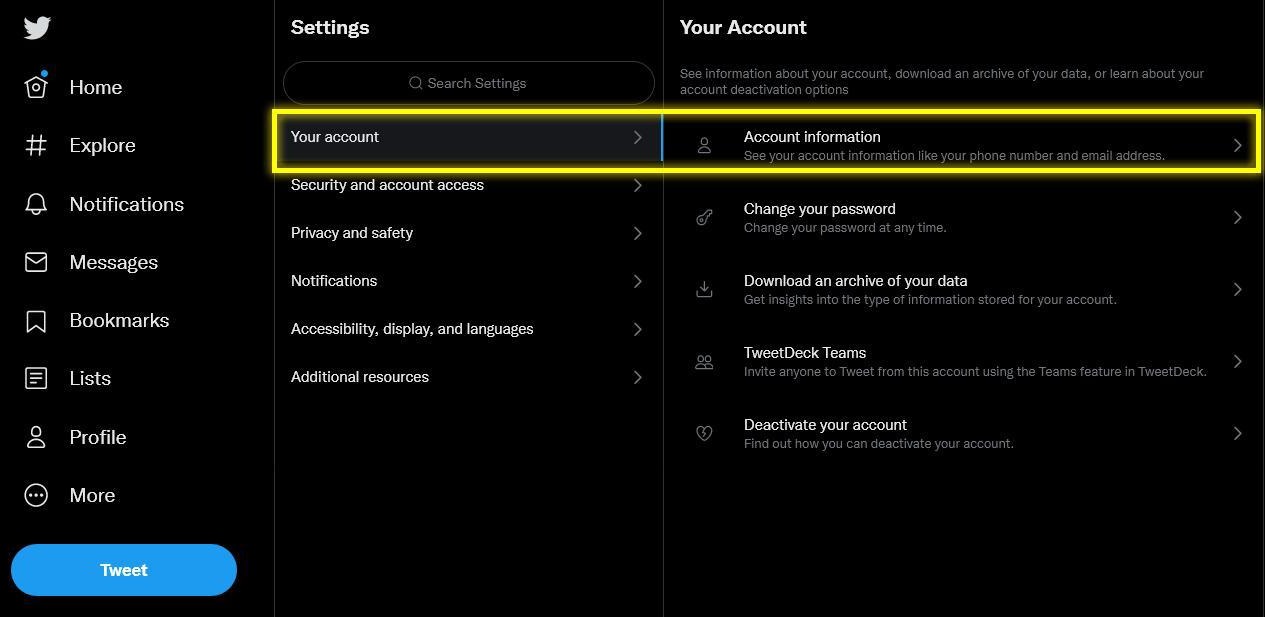
4. A new menu will open. Click on “Your Account.” Then click on “Account Information.”
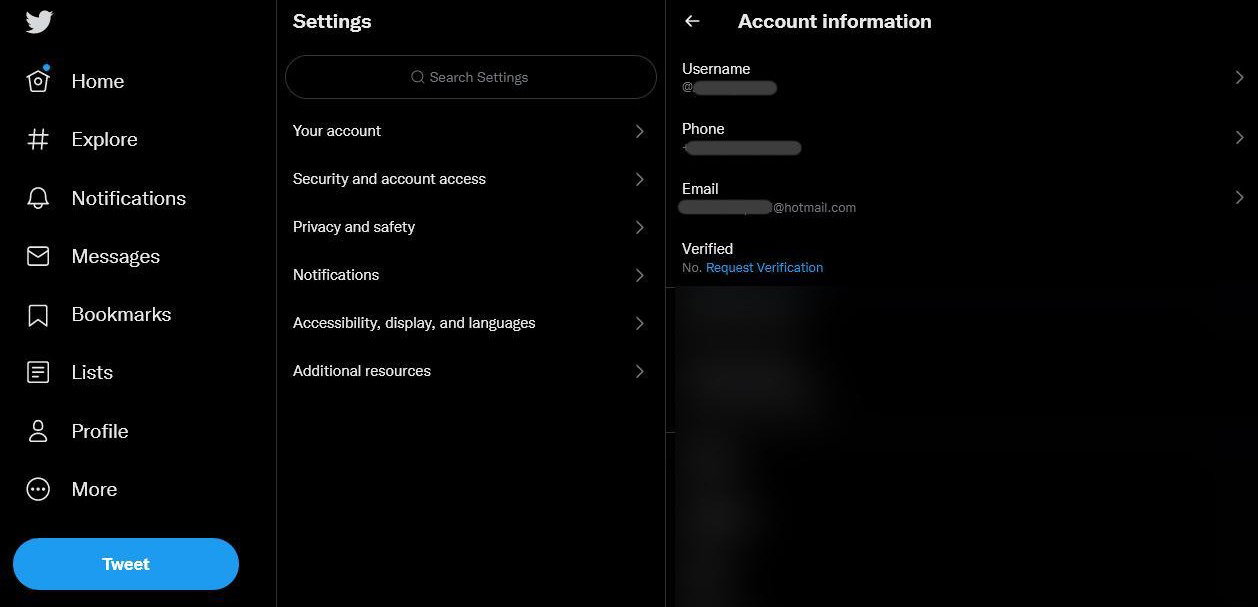
5. Here you will see all the credentials. Click on the email account.
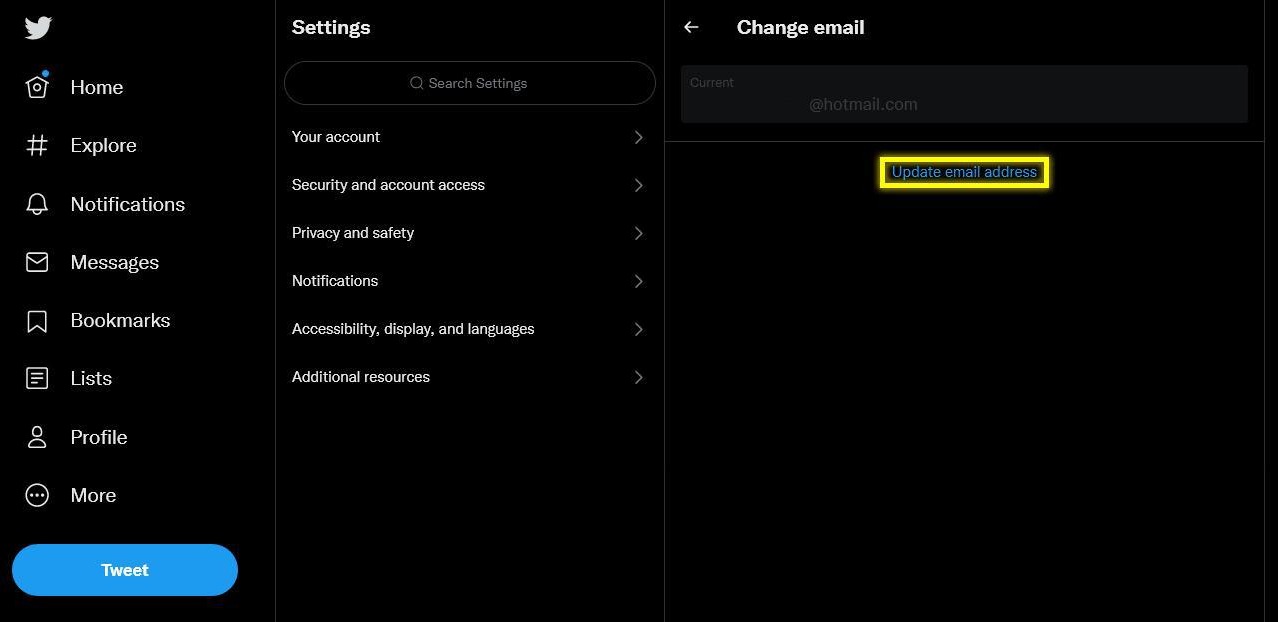
6. You will be asked to enter your password. Enter it and then click on Update Email. Follow the prompts, and your email will be changed.
7. To change the password, go back to step 4 and click on “Change your password” instead of Account information.
The most important thing you need to check is whether you have 2 Factor Authorization enabled. If you have it enabled, the person buying the account will face problems while signing in. So it is advised to disable it before selling the account.
To disable it, follow these steps below:
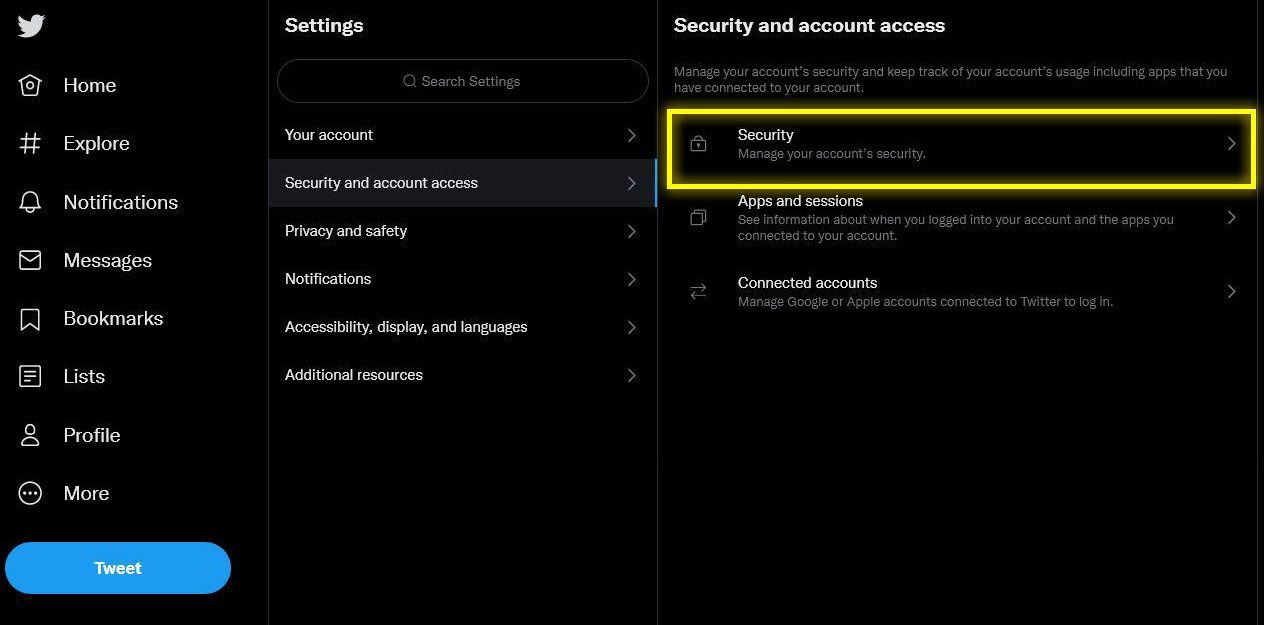
1. Open the settings by following the steps written above. Once you’re in settings, click on “Security and account access” and then click on “Security.”
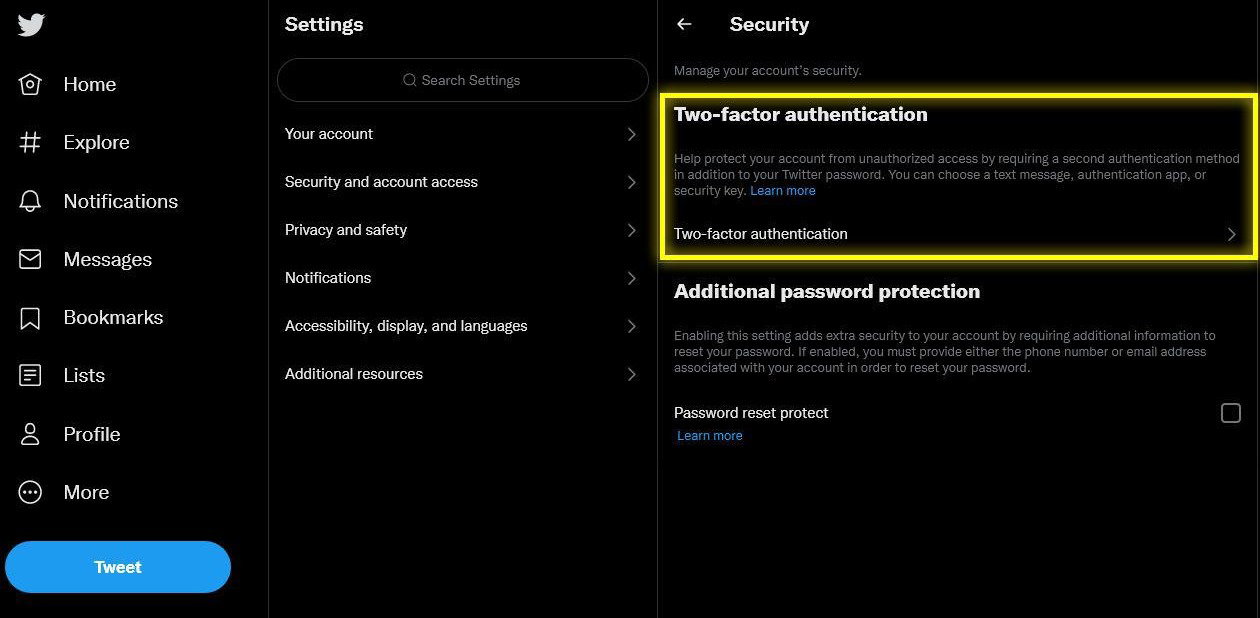
2. Now click on “Two-factor authentication.” Once you click on it, a few checkboxes will appear. If the boxes are checked, then the 2FA is turned on. Uncheck them to turn it off.
This is why many people like to buy and sell their Twitter accounts. These accounts have many followers and a great reach. If you’re starting out on your social media venture, then having such an account is very useful.
You can take a look at EPICSWP’s Twitter Marketplace to find listings for Twitter accounts.
So today, we will tell you how you can buy or sell a Twitter account and how to prepare it for transfer. The process is quite simple. Simply follow the steps below.
Buying A Twitter Account
If you’ve bought a Twitter account, you need to ensure that it is secure. To do that, you need to change your password and email.We’ll be showing you the process through the web version of Twitter, but the app version is exactly the same since Twitter uses the same interface.
Follow the steps below:
1. First of all, open Twitter and sign in to your newly bought account with the credentials.
2. Once you’re logged in, click on “More” on the left side of your screen
3. A drop-down menu will appear. Click on “Settings and Support,” then click on “Setting and privacy.”
4. A new menu will open. Click on “Your Account.” Then click on “Account Information.”
5. Here you will see all the credentials. Click on the email account.
6. You will be asked to enter your password. Enter it and then click on Update Email. Follow the prompts, and your email will be changed.
7. To change the password, go back to step 4 and click on “Change your password” instead of Account information.
Selling a Twitter Account
If you’re looking forward to selling a Twitter account, then you need to prepare the account first. You need to make sure that everything is secure and that the person buying it won’t face any issues.The most important thing you need to check is whether you have 2 Factor Authorization enabled. If you have it enabled, the person buying the account will face problems while signing in. So it is advised to disable it before selling the account.
To disable it, follow these steps below:
1. Open the settings by following the steps written above. Once you’re in settings, click on “Security and account access” and then click on “Security.”
2. Now click on “Two-factor authentication.” Once you click on it, a few checkboxes will appear. If the boxes are checked, then the 2FA is turned on. Uncheck them to turn it off.
Tips for Sellers
- Make sure you have access to the associated email account so you can receive a code when customers demand one.
- Don’t provide the login and codes before establishing mutual trust.
- If the buyer refuses to go first and you don't trust them, try using Trade Guardian and hiring an official EPICSWP Middleman to assist you in completing a secure transaction.
- Remove any payment links associated with your account, such as Google Pay.
- Unlink all other accounts and devices linked to the Twitter account.
Tips for Buyers
- Verify that the account you’re buying matches the one that is being advertised.
- After purchasing a Twitter account, make sure to secure your account by changing the password.
- Make sure the account is not linked to another account, such as Facebook or Twitter. If it is, simply delink it and then secure it.
Screenshots
7 from the sellerScreenshots are supplied by the seller. Always verify the account in the deal chat before confirming receipt — funds stay in escrow until you do.
Account metrics
Page Views
1,263
VerifiedNoStatusAvailablePaymentEscrow protected
- Category
- Blogs
- Listed
- Aug 4, 2023
- Seller
- @epicswp
Price
Price on request
Message the seller to agree a price
Funds held safely in escrow until you confirm receipt. If anything goes wrong, open a dispute and a moderator will intervene.
Seller
0
deals
100%
trust
3y
tenure
Aegis-monitored deal chat
Every message is scanned for scams. Off-platform payment requests are blocked automatically.
About this listing
Frequently asked questions
Buyer pays the seller's price plus a 6% escrow fee through secure payment. Funds are held safely by EPICSWP. The seller delivers the product, the buyer confirms receipt, and only then are funds released to the seller.
Secure online payments. Multiple payment methods available. Payments are irreversible, which protects sellers from chargeback fraud.
Either party can open a dispute. Aegis investigates the evidence and generates a Case Summary Report. A human moderator makes the final ruling within 24-48 hours.
A 6% escrow fee is added to each transaction (paid by the buyer). Withdrawals have a 3% fee. No listing fees, no monthly subscriptions, no hidden charges.
Yes. All funds are held in escrow and every money movement is atomic, server-side, in integer cents, with an immutable audit trail. Funds only release when both parties meet their obligations.